
What Is Google+ Creative Kit (With Video)? Add Halloween Effects Through the Halloween Limited Edition!!
Google+ creative kit is a quick and fun way to do creative edits to your photos within Google+ and the convenience of your browser (No softwares to download and install).
Cool huh? Absolutely. On top of that for a limited time, there is a Halloween limited edition where you can touch up your photos with your favorite halloween costumes.
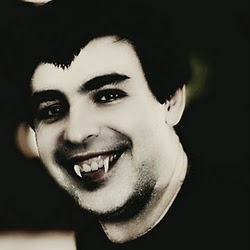
Larry page halloween profile picture
Have you seen the recent +Larry Page Co-Founder and CEO’s profile picture (refer image), it is the magic of Google+ creative kit (previously known as piknik). Want to have similar fun with your profile picture or any of your photos?
How to use Google+ creative kit?
- Login into Google+
- Click on the Photo’s tab
- Click on Your Albums in the left
- Click on a Album on the right
- It’ll show you the list of photos in that album
- Click on a photo that you want to add some creative fun
- In the bottom look for the Edit link and click on it
- In the menu select Creative Kit
- Creative Kit editor will load (Note there is nothing to install)
- If you look at the left side, you’ll find all the options and features that you can add to your photos (They are all self explanatory)
- On the top – left, you’ll find Halloween option (This is a limited edition, It might go away after halloween)
- Click on the Halloween option
- On the left side it’ll load all the halloween effects available grouped by categories (Vampire, Reanimated, Haunted, Costumes, Decorations) followed by effects (Vampire Eyes, Draculan Dermis, Fangs, etc…)
- Click on a effect that you are interested. It’ll show all the detailed effects that you can apply under a particular effect
- Double click or drag a particular item to your photo and place it wherever you want it (Drag a teeth near to your mouth, you get the idea!)
- Once you are done with all your effects, click on the save button
- It’ll provide you options to overwrite this photo or save it under a different name
- Now you can go back to your profile and set it as your profile picture
Halloween photo fun contest
Got creative skills? Want to compete with others on Google+? Here is your chance.
Google is running a competition through the end of October 2011. Create your unique and fun creative photo using Google+ Creative Kit and share it with Public with hashtag #gplushalloween. On Nov 3rd 2011 a panel of surprising celebrities will announce their favorites.
A quick video about Google+ creative kit
Yet another fun and unique feature only available in Google+. Enjoy and have fun!!!
+ There are no comments
Add yours