

How to Connect and Post to Google+ From Blogger or Blogspot?
We’ve earlier covered about How to post to blogger right from Google+? and also How to link and replace your blogger profile with Google+ profile?.
But we get this question all the time from readers about doing the reverse i.e How do i post automatically to Google+ right from blogger.com / blogspot.com?
Until today it was not possible to do that. Now there is good news. As part of the effort by Google to socialize their products, Blogger team today rolled out a feature that allows exactly what you were asking for. A tighter integration between blogger and Google+ and it allows to share your post with your Google+ friends, circles or others right from blogspot.com.
How to post to Google+ from blogger?
Connect Google+ with Blogger
- Follow steps outlined in switch your Blogger profile with your Google+ profile
- Refer image above for connecting blogger to Google+
- Write a post as usual on blogger
- Publish the post
- Once successfully published, you’ll be presented with a Google+ share box
- Enter a comment, Add people or circles and hit Share
- That’s it. Your blog post is instantly posted to Google+
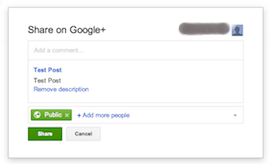
Google+ share box after publishing post
How to turn off sharing with Google+? (This will disable the Google+ share box from appearing after publishing)
-
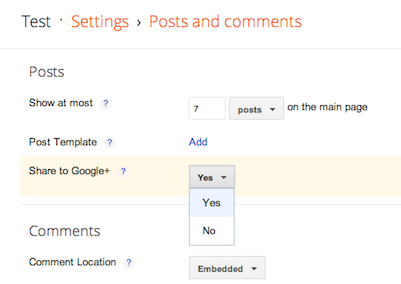
Turn Off Google+ Sharing in Blogger
Goto your blog on blogger.com/blogspot.com
- Find the blog you want to change settings
- Click on Settings in the drop down menu next to your blog
- Click on Posts and Comments
- Change Yes to No under Share to Google+
- Click on Save settings button on the top right
- That’s it, This will prevent the Google+ share from showing up
Another way to share to Google+

Bogger post Google+ share link
Enter into your blog, click on the Posts link and you’ll find list of posts on the right. Right below every post you’ll also find a Share link that’ll allow to share to Google+ (refer image above)
Enjoy sharing content between blogger and Google+.
+ There are no comments
Add yours